> For the complete documentation index, see [llms.txt](https://prethink.gitbook.io/prtelegrambot/llms.txt). Markdown versions of documentation pages are available by appending `.md` to page URLs; this page is available as [Markdown](https://prethink.gitbook.io/prtelegrambot/getting-started.md).

# Getting started

Everything you need to do to get your first bot running.

## Create a bot in BotFather

Every Telegram bot is registered through [@BotFather](https://t.me/botfather), the official Telegram service for that.

1. Open Telegram and find **BotFather**.
2. Start the conversation with **/start**.
3. Send **/newbot** to create a new bot.
4. Give the bot a name and a username when asked.
5. BotFather replies with an access token, something like `1234567890:ABCDEFGHIJKLMNOPQRSTUVXYZ`.
6. Copy it. That token is unique to your bot and is what authenticates every call to the Telegram API.

{% hint style="warning" %}
Keep the token out of version control. Use [user secrets](https://learn.microsoft.com/en-us/aspnet/core/security/app-secrets), environment variables, or a configuration file that is excluded from the repository.
{% endhint %}

## Install the package

The library targets .NET 6.0 and runs on any newer version.

```sh
dotnet new console -o MyBot
cd MyBot
dotnet add package PRTelegramBot
```

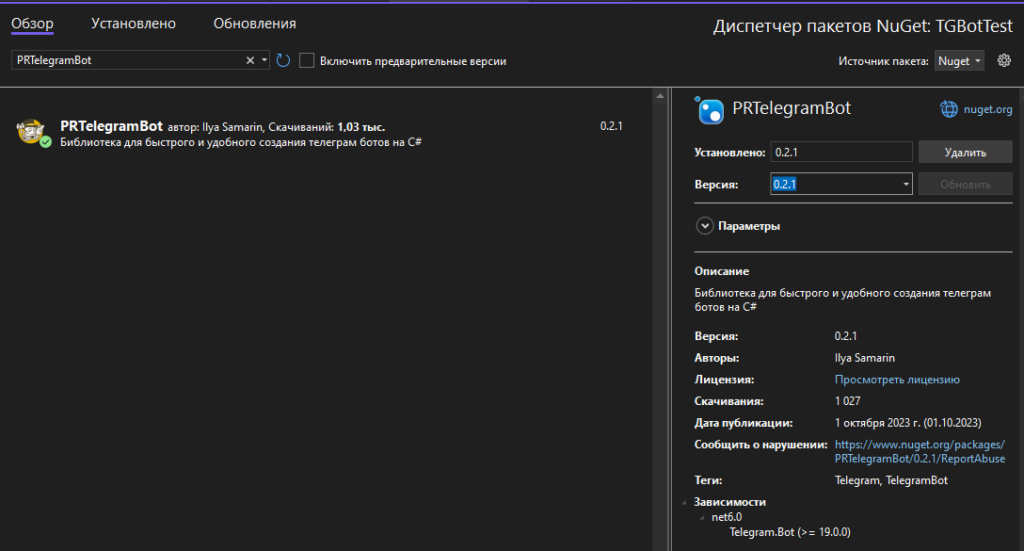
Or install **PRTelegramBot** from the NuGet package manager in your IDE. The package page is [here](https://www.nuget.org/packages/PRTelegramBot), and the source is on [GitHub](https://github.com/prethink/PRTelegramBot).

<figure><img src="https://2944379407-files.gitbook.io/~/files/v0/b/gitbook-x-prod.appspot.com/o/spaces%2FQqyzC7XXS9MB8ZdUxPl7%2Fuploads%2Fgit-blob-e78bb3d7d57eeb3a5f281170a4698cdb5288868f%2F%D0%B8%D0%B7%D0%BE%D0%B1%D1%80%D0%B0%D0%B6%D0%B5%D0%BD%D0%B8%D0%B5%20(27).png?alt=media" alt="Right-click the project and choose the NuGet package manager"><figcaption><p>Right-click the project, then open the NuGet package manager (screenshots are from a Russian-language IDE)</p></figcaption></figure>

<figure><img src="https://2944379407-files.gitbook.io/~/files/v0/b/gitbook-x-prod.appspot.com/o/spaces%2FQqyzC7XXS9MB8ZdUxPl7%2Fuploads%2Fgit-blob-7d8d941a5e4004533ee56904a351824018e93748%2F%D0%B8%D0%B7%D0%BE%D0%B1%D1%80%D0%B0%D0%B6%D0%B5%D0%BD%D0%B8%D0%B5-1-1024x551.png?alt=media" alt="Search for PRTelegramBot in the Browse tab and install the latest version"><figcaption><p>Search for <code>PRTelegramBot</code> in the Browse tab and install the latest version</p></figcaption></figure>

## Start the bot

```csharp
using PRTelegramBot.Builders;
using PRTelegramBot.Models.EventsArgs;

// A PRTelegramBot instance.
var telegram = new PRBotBuilder("Token").Build();

// Ordinary log messages.
telegram.Events.OnCommonLog += Telegram_OnLogCommon;
// Errors.
telegram.Events.OnErrorLog += Telegram_OnLogError;

// Start the bot.
await telegram.StartAsync();

async Task Telegram_OnLogError(ErrorLogEventArgs e)
{
    // Handle errors.
}

async Task Telegram_OnLogCommon(CommonLogEventArgs e)
{
    // Handle log messages.
}
```

<figure><img src="https://2944379407-files.gitbook.io/~/files/v0/b/gitbook-x-prod.appspot.com/o/spaces%2FQqyzC7XXS9MB8ZdUxPl7%2Fuploads%2Fgit-blob-3b2dbcb3e56bd59af66c9e8c4c03ce6419362254%2F%D0%B8%D0%B7%D0%BE%D0%B1%D1%80%D0%B0%D0%B6%D0%B5%D0%BD%D0%B8%D0%B5-2.png?alt=media" alt="The console shows the bot starting and the log events firing"><figcaption><p>What a started bot looks like in the console</p></figcaption></figure>

Everything the builder can configure — admins, white lists, middleware, converters, background tasks, webhook settings — is described on the [PRBotBuilder](/prtelegrambot/prbotbuilder.md) page.

## Add a command

A handler is an ordinary method marked with an attribute. Nothing registers it by hand — the framework finds it by reflection when the bot starts, so adding a command means adding a method.

```csharp
using PRTelegramBot.Attributes;
using PRTelegramBot.Interfaces;
using PRTelegramBot.Services.Messages;

public static class Commands
{
    // Runs when the user sends /start.
    [SlashHandler("/start")]
    public static async Task Start(IBotContext context)
    {
        await MessageSender.Send(context, "Hello, World!");
    }

    // Runs when the message text is exactly "Ping", ignoring case.
    [ReplyMenuHandler("Ping")]
    public static async Task Ping(IBotContext context)
    {
        await MessageSender.Send(context, "Pong");
    }
}
```

Run the project, send `/start` to your bot, and it answers.

By default updates arrive through [polling](https://core.telegram.org/bots/faq#how-do-i-get-updates), which needs no public address and is the quickest way to start developing. Running behind a public URL instead is described under [Webhook](/prtelegrambot/getting-started/webhook.md).

## Several bots in one project

One project can run any number of bots. They are told apart by **BotId**, which you set on the builder and repeat on the handler attributes.

You might run five bots that all do the same thing, or five that each do something different — both work.

## Examples

| Example                                                                                                          | What it shows                                                                                                        |
| ---------------------------------------------------------------------------------------------------------------- | -------------------------------------------------------------------------------------------------------------------- |
| [Console](https://github.com/prethink/PRTelegramBot/tree/master/Examples/ConsoleExample/README.md)               | Most of the framework in one place: commands of every kind, menus, events, middleware, background tasks. Start here. |
| [ASP.NET](https://github.com/prethink/PRTelegramBot/tree/master/Examples/AspNetExample/README.md)                | A bot inside ASP.NET Core with everything resolved through dependency injection. Polling.                            |
| [ASP.NET webhook](https://github.com/prethink/PRTelegramBot/tree/master/Examples/AspNetWebHookExample/README.md) | Two bots on a single webhook endpoint, told apart by their secret token.                                             |